Connect GitHub
Pulls pull requests, code reviews, commits, and review comments per employee.
Prerequisites
- GitHub organization Owner role (only an org owner can install the PerfCopilot GitHub App for the whole org)
- OR, for the per-employee path, each employee can connect their personal GitHub account themselves; no org-side action required
- A PerfCopilot admin account (the Connect button is only visible to admins)
1. Generate credentials in GitHub
The manual connect path uses a Personal Access Token plus your GitHub Org slug. There is also an OAuth alternative (the org-wide GitHub App) if you prefer not to manage a token.
Flow A: Personal Access Token (manual):
- Sign in to https://github.com.
- Create a token. Use a classic PAT with the
repo:readandorg:readscopes, or a fine-grained token with read-only access to repository contents and pull requests.
📖 Official guide: Managing your personal access tokens: GitHub's own documentation for creating this credential.
- Copy the token value (it is only shown once).
- Note your GitHub Org slug (the
org_name, e.g.acme-incfromgithub.com/acme-inc).
Flow B: Org-wide OAuth install (alternative):
- Sign in to https://github.com as an org owner.
- Open https://github.com/apps/perfcopilot and click Install.
- Select the organization to install into.
- Choose All repositories (recommended) or pick specific repos. Click Install to confirm.
Copy these values; you'll paste them in the next step:
- Personal Access Token
- GitHub Org slug (
org_name)
2. Paste into PerfCopilot
-
Open Integrations on your PerfCopilot admin.
-
Find the GitHub card and click Connect (or Manage if already configured).
-
Paste each value into the matching field:
Field in PerfCopilot Value from step 1 Personal Access Token <your value>GitHub Org slug acme-inc -
Click Save.
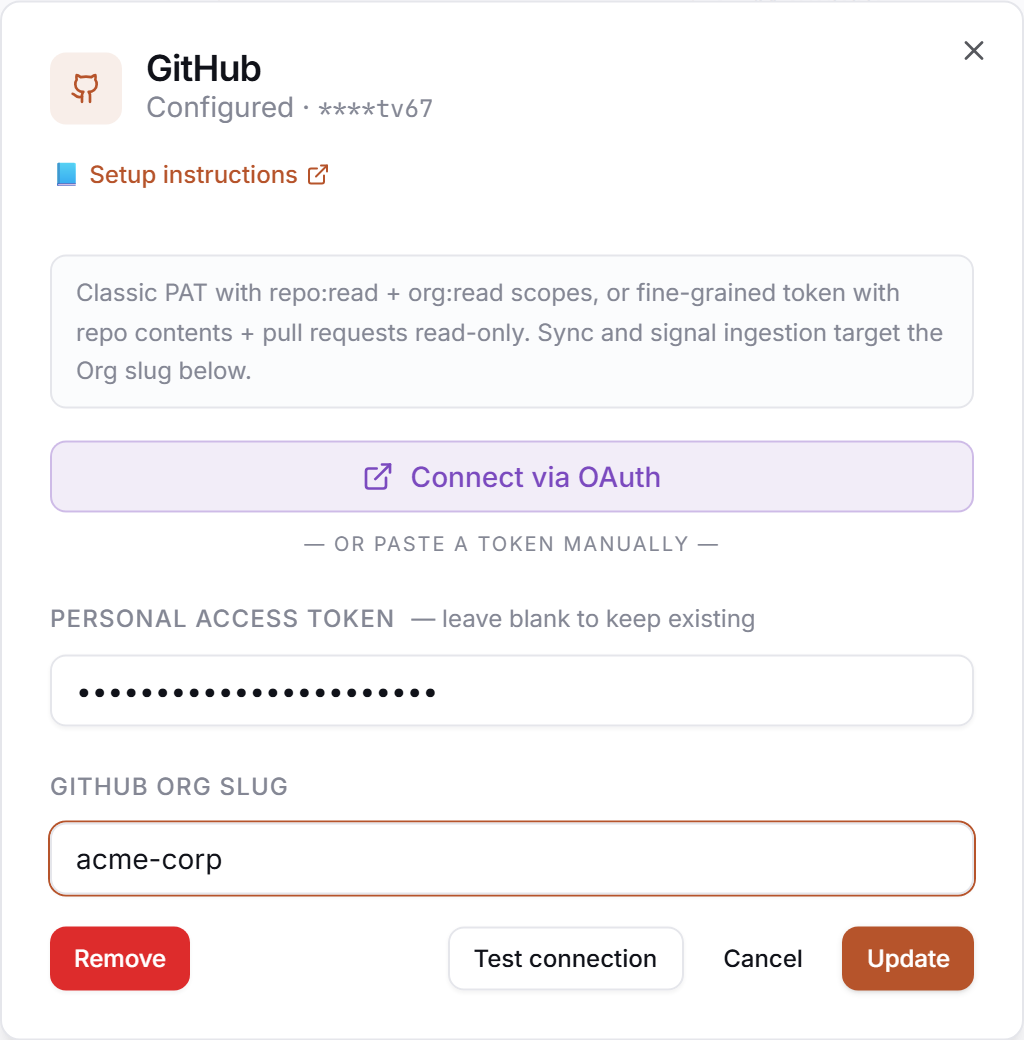
3. Verify
Click Test in the drawer. Expected:
✅ Authenticated as your-org
If you see a red error, jump to Common errors.
Common errors
| Message | What it usually means | Fix |
|---|---|---|
OAuth state mismatch | Cookies or popup were blocked between the redirect and callback. | Retry the flow in a clean tab; allow popups for app.perfcopilot.com. |
HTTP 401: bad credentials | The GitHub OAuth token was revoked or has expired. | Re-run the Connect flow to mint a fresh token. |
Insufficient scope | The app was installed without the right repo scope (e.g. limited to one repo). | An org owner re-installs the app at https://github.com/apps/perfcopilot and grants the broader scope. |
What signals we pull
pull_request: pull requests authored by the employee.code_review_given: reviews and review comments the employee left on other people's PRs.commit_cadence_summary: rolled-up commit activity per employee per cycle.
Need a feature you don't see? Tell us →.